menu
menupublCIF
publCIF - free software to edit and preview a CIF for publication
publCIF takes a crystallographic information file (CIF) and prepares a formatted paper (Preprint) in the style of Acta Crystallographica Sections C and E, and IUCrData.
The CIF and the Preprint are presented side-by-side and are both editable. Changes made to one are applied to the other as you type.
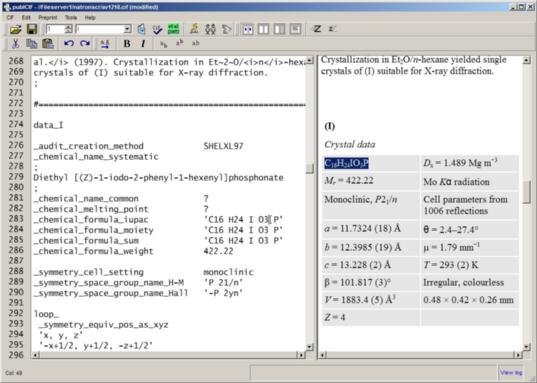
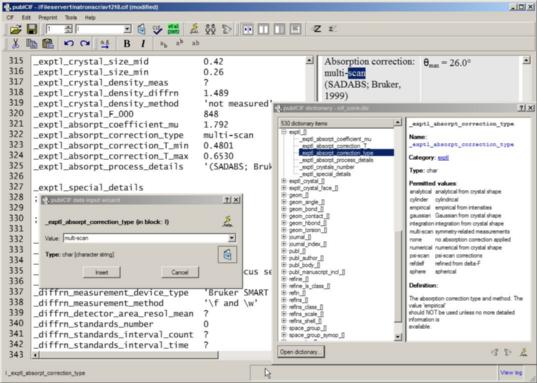
Starting with a CIF resulting from a structure refinement, use publCIF to:
- Add data items required for publication, using simple wizards that check your input and access both dictionary information and data used in previous CIFs
- Prepare standard and customized geometry tables using simple spread sheets
- Write your paper using a word-processing environment
- Check your CIF, for both syntax and completeness
- Print or export a Preprint of your paper
publCIF employs extensive CIF syntax and dictionary compliance checking, both as you type and when specifically requested. In addition, it provides a number of editorial tools to help you write your paper in the style required by IUCr journals.
publCIF is described in J. Appl. Cryst. (2010), 43, 920–925 [doi:10.1107/S0021889810022120]
New in this version
Funding information
IUCr Journals now include a Funding information section in journal articles and additionally include this information in the distributed metadata associated with articles (see http://journals.iucr.org/services/funding.html).
This version of publCIF includes a widget to collect such data for CIF-based articles.
Download
To download a free copy of publCIF, please fill out your email address and click on the download button below. We will use the email address to notify you of new releases of the program.
Windows version 1.9.22 (XP, Vista, Windows 10)Linux version 1.9.22 (info)MacOS X version 1.9.22 (Mac OS X 10.6 onwards) |